Take a Break
Protect your eyes while you build.
A quiet macOS menu bar companion for 20-20-20 breaks, blink and water reminders, warm tint, and a schedule that respects your day.
The rhythm
Built around the 20-20-20 rule.
Every 20 minutes, rest your eyes for 20 seconds by looking 20 feet away. Take a Break makes that habit automatic.
- 01
Focus
Work uninterrupted. Screen time ticks from the menu bar — with optional blink and water nudges along the way.
- 02
Pause
When it’s time, every display softens into a calm overlay. Look about 20 meters away, or take a break now with your shortcut.
- 03
Return
Quiet hours step aside when you’re off the clock. Stats keep score of today’s rhythm — then you’re back, clearer.
Designed for deep work
Soft enforcement. Serious care.
Breaks, blinks, water, tint, schedule, and shortcuts — everything you need to stay healthy without breaking your flow.
Menu bar quiet
Lives in the menu bar. No Dock icon. Always near, never in the way.
20-20-20 breaks
Timed focus sessions end in a full-screen pause — look about 20 meters away, then return clearer.
Every display
Break overlays cover all connected screens so the pause actually lands.
Blink nudges
Gentle, non-blocking reminders between breaks help dry eyes stay comfortable.
Drink water
Optional hydration reminders on every screen — set your interval, tap Continue, keep going.
Warm tint
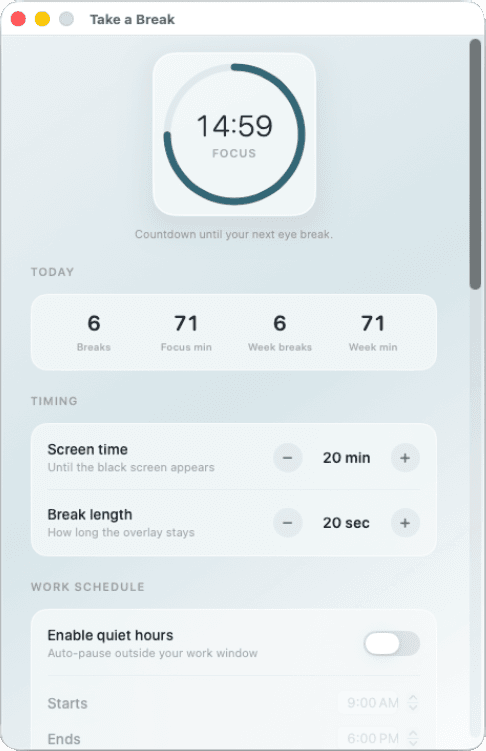
Five soft shades and three intensities. Click-through warmth for late sessions.
Quiet hours
Auto-pause outside your work window. Weekdays-only or overnight schedules included.
Your timing
Tune screen time, break length, blink interval, and water reminders to match how you work.
Quick break shortcut
A global hotkey skips straight to a break. Record your own, or reset to the default.
Soft cues
Optional Glass or Pop sounds at break start and end — volume you control, previews included.
Today’s rhythm
See breaks completed, focus minutes, and your week at a glance from Settings.
Start at login
Open with your Mac so healthy habits begin with the day.
macOS 14+
Give your eyes a quieter day.
Native menu bar eye care — breaks, blinks, water, tint, quiet hours, and shortcuts. Free stays free; Pro themes are on the way.